
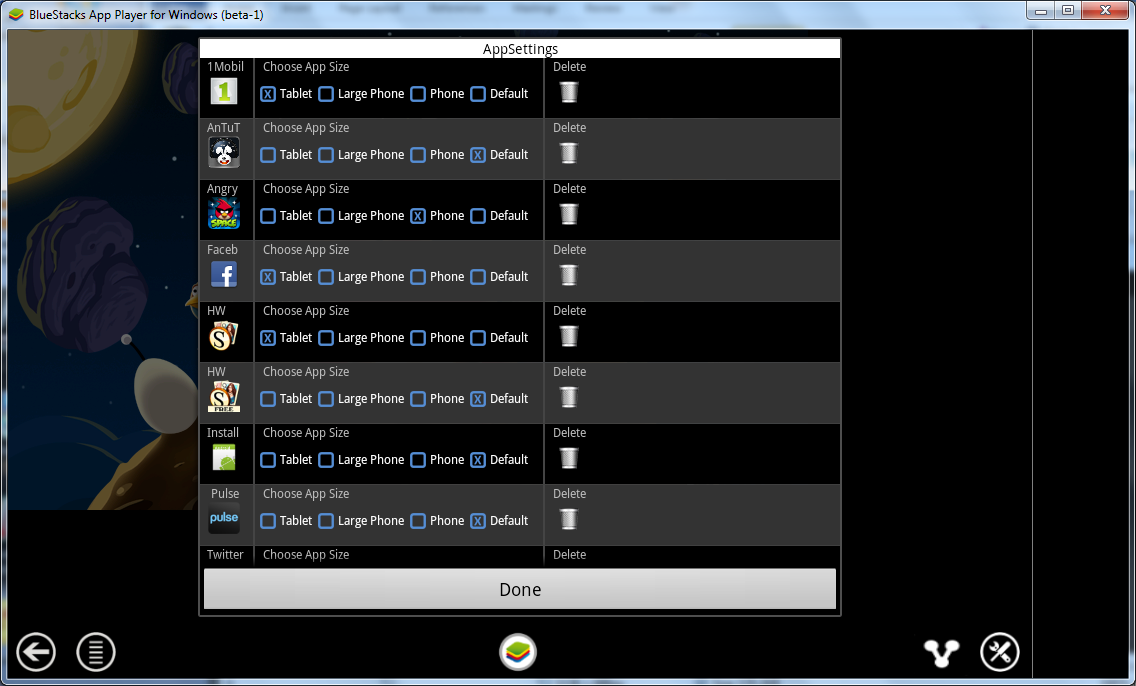
Netbooks and slower computers will run slow. My Acer Aspire One actually ran slower than my LG Marquee phone (which is already pretty slow when compared to other Android devices), but my Intel i920-based PC ran completely smooth.
There isn’t a full Android desktop with sliding, photos, camera and wallpaper. You just get a very basic icon that you can launch. By default the application uses a hardware keyboard, so the software keyboard doesn’t come up all the time.
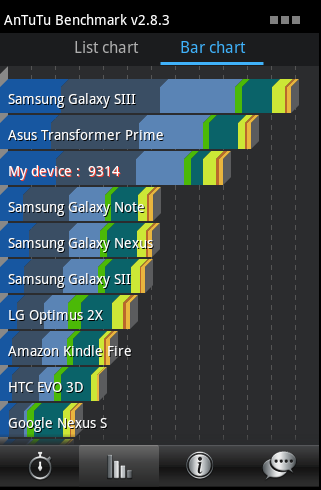
Individual applications can be set to run as a tablet, large phone, or phone. Basically that tells the application which resolution to default to, but you can also set up your overall resolution. Android OS only supports 1280×720 resolution. Bluestacks won’t run full-screen per se, but it will scale up, but the base resolution will be 720p.
So there you have it. You can run just about any Android application for phones or tablets on your PC. This can give you an idea if you want to pluck down some money for a good tablet, or just let you play some of the latest Android games and take screenshots.


5 comments
Come to find out that BlueStacks has a bunch of embedded adware. Not only will you see "buy this app" pop up on your desktop, but you'll get redirects to targeted ads when you search in any of your browsers.
I uninstalled BlueStacks and no longer recommend it until they remove their sneaky ad campaigns.
Yeah, I have to test for Google Chrome on Android, but Chrome requires Ice Cream Sandwich (Android OS 4.x). BlueStacks doesn't seem to support this OS yet, so Chrome won't install. Have to use VirtualBox to run Chrome for app testing. I'll upload the image I use for VirtualBox shortly…
so where is the image for virtual box? I downloaded an android image and I can't get it to go past the android logo to load anything. I used the android 4.4.
thanks for this. I have to test my applications for tablets and this makes testing for compatibility easy !
[…] Emulate an Android Tablet on Your PC […]
Comments are closed.