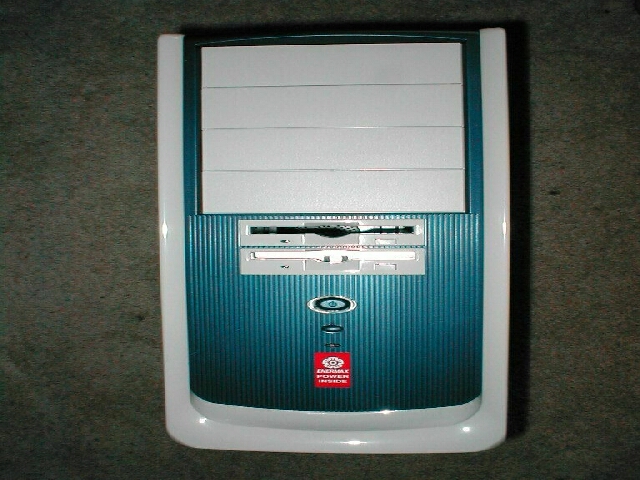
Before I continue any further I must point out that every edge on this case is very smooth, there are no sharp edges or jagged pieces. Every part of this case that I touched was great which is something I really love, it can hurt quite a bit when you slice yourself on your case.
This case does not come with a slide out motherboard tray which is kind of a pain, instead of being able to pull the tray out and have an open workspace you have to do everything inside the case. The first thing I did was to get 6 motherboard standoffs, and thread them into the appropriate location, I like the fact that you get so many of them along with screws, I always end up loosing some.


I then placed my motherboard in the case on the standoffs and screwed it into place. I then installed my video card and NIC. I pulled this system out of another case so I just left the CPU, HSF, and RAM in. everything went in great with no hassle, I have worked with some cases where its a struggle to get the motherboard and cards to go where they are supposed to.
I then installed my CDROM, hard drive and floppy, again everything went in smooth with no problems. With other cases a lot of the time you have to struggle to get them in right, but just like the motherboard and cards everything went smooth. There is a ton of room in this case and if I took 15 minutes to clean it all up it would look awesome.

Test Bed
- MSI KT7 Pro 2-A
- Duron 800Mhz
- 512MB PC133 RAM
- Asus v7700 Geforce 2 GTS
- 300w Antec PSU
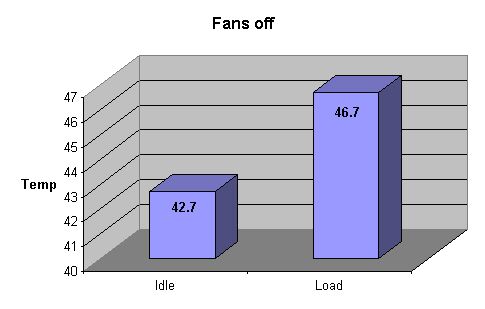
I will be using a thermal probe to take all of the tempatuires from the CPU. I first booted up the computer without the fans on and let it idle for about 30 minutes and took the readings. I then used Prime95 to torture test the CPU and bring it to its load temperature. Not too bad, but lets turn those 2 fans on that came with the case and see what the results are.
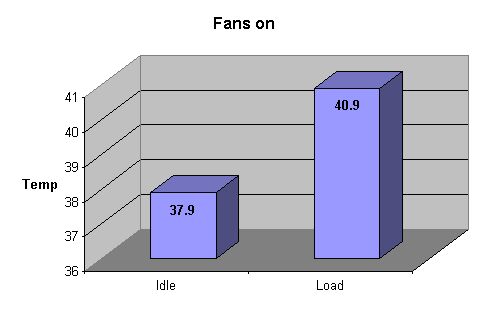
Same test before, I even left the CPU hot, I did not let the computer cool down. I shut the computer down long enough to plug both fans in and rebooted. The fans were a little loud, and sounded kind of funny because of the way that the way the holes are designed. I had the side fan blowing air into the case and the top one sucking air out of the case. Again I let it idle for about 30 minutes and took the readings. The idle temperature was 4.8 degrees Celsius lower with the fans. I then used Prime95 to torture test the CPU and bring it to its load temperature. Again the fans did their job, this time 5.8 degrees Celsius lower than without the fans, very impressive!
Conclusion
Overall I really like this case, there are so many great features that the small negative points are totally blown out of the water. Every negative thing about this for the most part can be easily fixed with some simple mods. If you are going to buy this case I would suggest the following, I would cut the blowhole and side hole to be 92mm so that I could have better airflow and get some regular screws to attach the fans.
I would also suggest that if you are going to use a 120mm in the front that you provide a better intake. I really like that Enermax took the time to make this case user friendly, all the edges are nice and smooth and the case has lots of room to work in.
You get a great power supply and this case has great modding potential, this case retails for about $60 on Pricewatch which is an awesome price considering all you get. If you are looking for a new case I would really recommend this one to you. I would like to again thank Franky from Enermax for sending this case to review.
Pros
- Looks awesome
- Great price
- 300w P4 ready power supply included
- Cables on power supply NOT too long
- 2 fans included
- Drops CPU temperatures considerably
- All edges are smooth
- 6 good expansion slots included
- Lots of bays
- Lots of places for fans
- Lots of room
Cons
- No motherboard tray
- No fan grills or screws
- Bezel attached with screws
- No case badge area
- fan holes not completely cut out
- It’s a little loud