

You can also install plugins to your web browser that lets you take a screen capture of the entire web page.
There are a few plugins for Firefox, and one of the more popular ones is Screengrab. Unfortuntely, this program doesn’t work on the later versions of Firefox, and the Firefox browser has a habit of self-updating without asking or checking compatibility of your plugins. So, that option is not feasible.
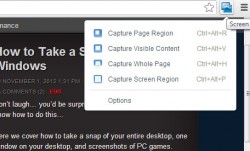
Since most of the OCmodshop readers are using Google Chrome, you can install a great plugin called Google Screen Capture (get the plugin here).
This plugin installs a little icon that you can use to get the whole page region, part of a page, or scroll and scrape the entire web page. To do this, click on the Screen Capture icon, and then select “Capture Whole Page“. You can also use the keyboard shortcut Ctrl + Alt + H.

The entire web page will be captured, which you can then save.
On the next page we show you how to take PC game screenshots automatically…



5 comments
[…] How to take a Screenshot in Windows @ OCmodshop […]
[…] How to take a Screenshot in Windows @ OCmodshop […]
I also added a new page about taking a scrolling screenshot of an entire web page. That way you can get everything, even if it's off screen.
Don't forget the built-in Snipping Tool (http://windows.microsoft.com/en-us/windows7/products/features/snipping-tool).
Thanks, Sekers. I forgot about this. I've added a section to the article about this tool.
Comments are closed.