

If you’ve implemented these rules on your firewall, then you’ll probably get a lot of complaints from your roomates, spouses, and children that they can no longer use their email clients. You have a few options:
- Insist that they use a webmail client
- Add exception rules for their particular IP
- Update their mail client to use Secure SMTP (or IMAP)
- Tell them to go screw themselves
Pretty much any response except Number 3 will ensure there is urine in next morning’s coffee. If you add an exception just for one computer, then you’ll still run into the same problem if that computer happens to get a virus, so I wouldn’t recommend doing that. Webmail already uses a web browser, so those ports (80 and 993) are probably already open and they would have no issues.
The best (and most transparent solution) for your end users is to update their mail client to use Secure SMTP (port 465) instead of SMTP (port 25). If their particular mail service supports IMAP, then you could do that, too. That way, users are more secure (and less likely to be hacked), anonymous SMTP traffic still gets blocked (a la viruses), and you still have a secure network. It’s win-win, baby.
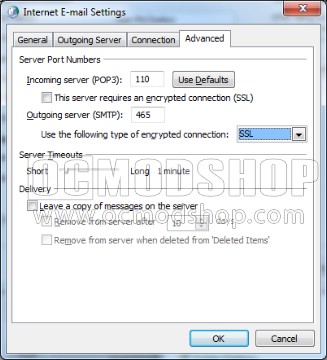
In Control Panel, click on Mail. You can optionally do this in Outlook by clicking on “Tools” and “Accounts”. Modify their existing email account. You need to click on the “More Settings” button. In the new window, click on the “Advanced” tab and make the following changes:
- Change “Outgoing server (SMTP)” to “465”
- Change “Use the following type of encrypted connection” to “SSL”
- Click OK and save the changes
You can test the settings or try to send new email, but if you’ve done everything right then your users will never know there’s anything different.

