
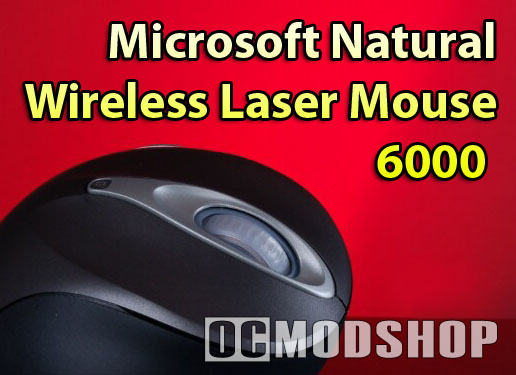
This mouse is designed to pair well with Microsoft’s Natural Ergonomic Keyboard 4000, which is one of the most comfortable keyboards I’ve ever used. The Natural 6000 mouse has an unusual rounded shape, resembling a softball. There have been other “extremely ergonomic” mice before, but were so strange-looking (no matter how well they performed) that they remain a niche item for ergonomic extremists.
The wireless interface is the same 27MHz technology Microsoft has been using for years on their wireless mice. This technology has been improved over the past several years to reduce lag to the point that it is just as good as a wired mouse (when first introduced it was horribly laggy). The wireless receiver (which also ironically looks like a mouse) plugs directly into your PC’s USB port, and has a range of about six feet. Although the low frequency is more prone to interferance and range issues, it should also, in theory, increase battery life.
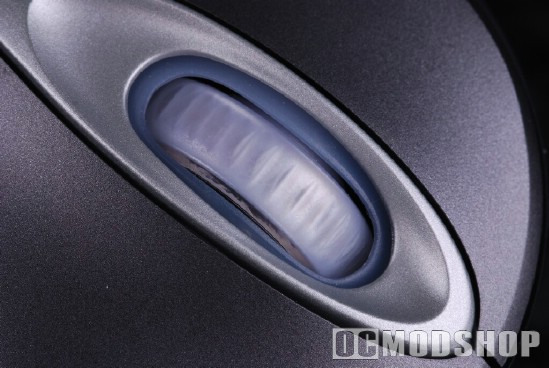
The mouse is coated with a rubber-like surface for extra grip, but the silicone thumb scoop is much softer, and almost sticky. The main buttons are slightly sculpted, and most fingers will fall naturally onto them. The scroll wheel is coated with the same material on the thumb rest, so the slightest touch makes contact. The wheel scrolls seamlessly, so there is no clicking when scrolling up or down, which may be great for spreadsheet-jockies, but not for gamers. The scroll wheel is also mounted on a tilt-wheel, so the wheel can be tossed to the left or right side to support horizontal scrolling.


Just below the scroll wheel is a small battery status LED, which turns on when the AA battery power is low. You can still check your battery status with the Intellipoint software.
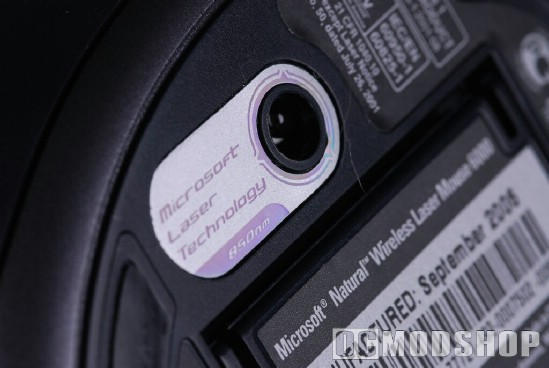
On the bottom side of the mouse you can see a bunch of markings, the battery compartment, the 1000 DPI laser eye, and a small connect button (used to synchronize with the receiver). There are three Teflon feet to ensure you have a smooth move.
The IR laser is very sensitive, and will track on surfaces that optical mice simply could not, like translucent or transparent surfaces. The laser is also spot on with unconventional surfaces like a pant leg or your forehead.
New-Age Ergonomics
Most mice are relatively flat, with your wrist resting flat on the work surface, but the unusual shape of the 6000 moves your wrist off the table, and how the pinky-side of your hand is the new pivot-point. Because of the extra-round shape, the mouse is not as long as previous models, so those with large hands may find their fingers going over the edge of the mouse buttons. Most hands will fit comfortably, with the index and middle finger resting on the primary and secondary mouse buttons. Since the area for the mouse wheel is so large, I found it more comfortable to rest my middle finger there, using my ring finger for the secondary button. There is a nice little ledge where your thumb rests, which is cushoned with silicon rubber, which helps grip.

Other vertical mice force the hand into a more “natural” handshake position. At first, this method does feel alot more comfortable, like slipping into a custom-make pair of slippers made from newborn kittens. The feeling is a little unfamiliar, but unusually comfortable. After a while though, it starts to become a little uncomfortable. Much like putting arches in your track shoes support your feet in a “more natural” way, they become painful because you’re not used to it. Although your wrist is bent into a more natural position, its ergonomics are questionable because I don’t develop pain when using my previous mouse.
The front side button is now way out of reach, and it takes a conscious effort to stretch your thumb to click it. This button isn’t often used, as it is noramlly mapped as the “browse forward” button, but I’ve never accidentally clicked this button, and this new placement is an ergonomic hinderance rather than an improvement.
Since the pivot point has changed, gamers may have a hard time with this mouse. Many FPS gamers are “twitch flickers”, which uses their wrist as the pivot point. Now that your hand is raised, you move the mouse with your entire arm, rather than your wrist. This translates into frequently over-shooting your movements, which means missed headshots, frequent tauntings and lower team scores.



2 comments
i need an new natural wirelees laser mouse 6000 resiever plase help my!
Before using the Natural Wireless Laser Mouse 6000, I used to have shoulder pain. It has been a month since I am using it, and my shoulder pain stoped. Now, my pain are in my shoulder and my fingers!!! This mouse didn't suit me at all!
Comments are closed.