

You really need to run the included software in order to customize the OLED keys (no installation required). Thankfully the software is included on the keyboard’s onboard 128K flash memory, which functions like a standard USB drive (just plug in and you get a drive letter). This is a feature I’ve been screaming to the hardware industry about for several years, so kudos to OCZ for listening. The software is intuitive and easy to figure out. On the screen is a grid of nine keys laid out exactly like the keyboard. Just click on the key you would like to customize and assign a function to it. You can choose from pre-defined functions or create your own.

Amber OLED iconny goodness
The OLED keys can have “multi-tiered” configurations… in which the keys change to different commands depending on the first button pressed. This way you can create grouped functions or tiered tactical commands.
You can customize each key with a digital image in practically any format (but BMP, ICO, JPG or PNG will be the most popular used). The image must be 64 x 64 pixels, and you need to be aware that the OLED key is monochrome. If you copy a “Firefox” icon to the keyboard, then it will look like a horrible mess. You’ll get better results if you make it monochrome, increase the contrast, dither and reduce the colors, or a combination of these techniques.
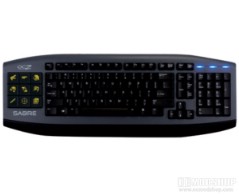
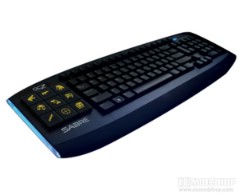
Using the keyboard for online games is a dynamic shift in the experience once properly configured. An icon that shows a grenade rather than reload has saved me from so many accidental gibs that I’ve lost count. Tactical shooters also receive a huge boon, thanks to the multi-tiered nature of the software. MMOs can benefit as well, but since there are so many functions to use, you’ll have to do some major planning to group your functions properly or just resort to your most-used commands.
On the next page we render our verdict…


7 comments
with current (and only) available drivers, the OLEDs have a built in 'screensaver' of 3 minutes. Its a feature confirmed by OCZ on their forums to prevent the OLEDs frmo burning out.
If you press one of the OLEDs, they will all come on again, but you will invoke the associated function of the pressed OLED button in the process
Someone's got it wrong yet again! Why stuff with the Home End block of keys? I rely on their three vertical pairs, and the familiar space around them and the arrow keys, to quickly access vital commands by feel. They also constitute a handy set of three up down toggles, and I often assign ‘End’ (at centre bottom) as a Zoom or Snipe key in First Person Shooters. Disappointed!!
It's like this keyboard is more for work productivity than gaming. I'm way more likely to use the key in a work setting, as well as use the keyboard with some light in the room (as opposed to the preference for complete darkness for a game). I find the lack of backlit keys to be bizarre and inconvenient, considering it has side lighting which doesn't seem very useful.
@Phillip: That's why we break down the grade so you can see what matters to you. If the keyboard were perfect, then it would have received a "perfect" badge.
Chris / Hi Flare. Have you lkoeod at the Microsoft Sidewinder X6? Much cheaper and has red backlighting? Or the Logitech G110, also cheaper and with multi-colour backlights.
First rule for a keyboard is backlighting. Second, spill proof.
You're a shill. No backlit keys, no media controls, no USB ports, expensive as hell, managing software is buggy, OLED keys aren't greyscale…
Comments are closed.