
3.1 – WHAT AUDIO TYPES ARE SUPPORTED BY THE PS3?
Mono
If you’re using an RFU adapter to connect your PS3 to a TV, then this is the audio type you’re getting. All audio is placed into a single audio channel. All PS1, PS2, and PS3 games support mono sound, but a lot of games deliver a much better experience with more audio channels.
Stereo
Stereo sound splits the audio channels into left and right channels, for a somewhat better game experience than mono audio. Stereo sound is supported by all PS1, PS2, and PS3 games.
 |
 |
 |
||||||||||||||||||||||||||||||||||||||||||||||||||||||||||||||||||||||||
|
* Universal but not recommended |
|
||||||||||||||||||||||||||||||||||||||||||||||||||||||||||||||||||||||||
 |
|
 |
Dolby Surround, aka Dolby Pro Logic 1
Dolby Pro Logic 1 (DPL1) is the original analog surround sound codec. Using the same two analog audio cables used by stereo sound connections, DPL1 has four distinct channels – front left, front center, front right, and surround (rear). The main problem with DPL1 is there is a small amount of “bleeding” between two channels. However, except for audiophiles with very high quality stereo systems, most users won’t notice it.
Just about every PS1 game made by Electronic Arts, and some other PS1 games, support DPL1. Also, DPL2 is backward-compatible with DPL1, so if you have a surround sound stereo that only supports one or the other, then don’t fret (too much).
Dolby Pro Logic 2
Dolby Pro Logic 2 (DPL2) is similar to DPL1, except that it adds a subwoofer channel and a second rear channel. Dolby Labs made this codec specifically for the PS2 generation of video game consoles, so many PS2 games that support surround sound use DPL2.
AC-3, aka Dolby Digital 5.1
AC-3 is the world’s most common digital audio codec. It works by compressing modulated audio blocks and sending the compressed audio over a digital link to a digital receiver, which decodes and plays the audio. AC-3 supports 5.1 channel audio – front left, front center, front right, rear left, rear right, and subwoofer. Since it is digital, there is no bleeding between speakers.
Other than HDMI, AC-3 audio is generally supported over the PS3’s optical audio cable. (In other words, the analog audio cables cannot carry AC-3 audio.) The PS3 uses a standard S/PDIF (“Sony/Phillips Digital InterFace”) optical cable, which is the most common type of digital audio cable.

No PS1 games support AC-3 audio. A small handful of PS2 games support AC-3 audio, such as “Metal Gear Solid 2” and “Xenosaga II”, but most PS2 games that support AC-3 audio only play AC-3 audio clips during cutscenes, since the PS2 did not have the horsepower to do on-the-fly AC-3 compression.
The PS3 has full hardware AC-3 audio compression support, so all PS3 games will use AC-3 audio at a minimum when either an HDMI or optical audio cable is plugged into the console.
On the DVD and Blu-ray side of things, AC-3 support is universal in commercial videos, since it is required by the standard.
AC-3 support is also universal in commercial digital stereos.
DTS, aka DTS Coherent Acoustics
DTS stands for “Digital Theater System” and it is a direct competitor to AC-3. DTS uses a less aggressive compression algorithm, and some audiophiles prefer the sound of DTS audio over AC-3.
No PS1 games support DTS audio. Since DTS is less CPU-intensive to compress than AC-3, a small handful of PS2 games support real-time DTS compression, such as “Grand Theft Auto: Vice City” and many EA Sports titles.

Also, some PS3 games, mainly (surprise) Electronic Arts games, support real-time DTS compression in addition to AC-3 compression, and will prefer DTS over AC-3 if you turned on DTS in your audio settings.
On the DVD side of things, some DVD video discs support DTS, while most don’t. On the Blu-ray side of things, all Blu-ray discs are required to have a DTS audio track.
Support for DTS in commercial digital stereos is a bit of a toss-up. Roughly half of them out there support it, and half of them only support AC-3. DTS-only digital stereos are exceedingly rare (do they even exist?).
VERY IMPORTANT: DO NOT enable DTS audio in a video game unless you are 100% sure that your digital stereo supports DTS. Since many digital stereo systems do not support DTS, it is possible to damage the stereo (not to mention your ears!) if you enable DTS support in a game on a non-supporting stereo.
Dolby TrueHD 7.1
TrueHD is the same as AC-3, except that it is lossless, and it has two more channels – left center and right center. This is the best possible audio type, but it requires an HDMI cable, since optical cables don’t have the bandwidth to support TrueHD.
Obviously no PS1 or PS2 games support TrueHD. DVDs also do not use TrueHD; only some Blu-ray movies use it.
3.2 – WHAT SHOULD I LOOK FOR WHEN CHOOSING A STEREO FOR MY PS3?
If you don’t have a lot to spend, then at the bare minimum, any 2.1 speaker sound system ought to be enough. Many popular PS2 and PS3 games make strategic use of multi-channel sound effects, such as “Metal Gear Solid 3”, so playing the game with mono sound actually puts you at a big disadvantage.
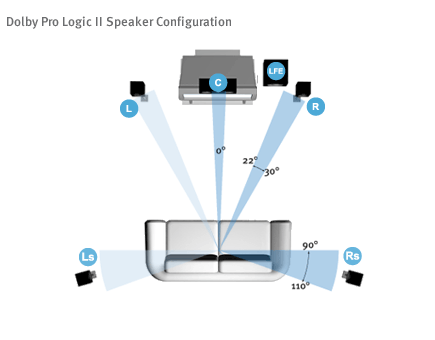
If you have a little more to spend, then you ought to consider a 5.1 channel system. You’ll want AC-3/Dolby Digital support with at least one S/PDIF input port. DTS support is nice but not necessary unless you’re a true audiophile or you regularly play the handful of PS2/PS3 games with DTS support.
And if you’re a **true** audiophile, then you probably already have a 7.1 channel HDMI-equipped sound system, so why are you reading this? :)
When buying a digital audio cable, you do not need to spend much money. Because the quality of the cable will have no effect on the quality of the audio, unlike the situation with analog audio cables, a $5 cable will sound just as good as a $30 cable.