Media Center 2005 and later has native support for Media Changers and immediately recognizes the unit without any software installation. Media Center then adds new buttons to the “My DVDs” section of Media center which allows you to Manage your Discs.
Once discs are inserted into the unit, Media Center will ask to scan each disk to add them to the library. Be sure that you add as much media as you can at one time, because scanning a hundred discs or more takes over an hour. Even though scanning can take place in the background, your HTPC is virtually useless during this time as the computer halts while changing and scanning media.
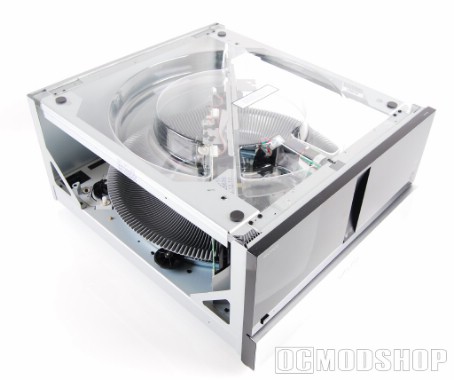
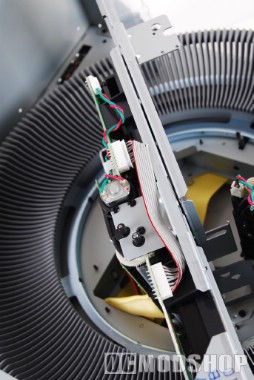
One thing you’ll also notice is the Media Changer is LOUD! The media spindle is belt driven, and sounds very similar to the machines that pulled Han Solo out of the carbonite chamber… I’m not exaggerating; it sounds exactly like that. Maybe Skywalker Sound uses one of Sony’s Media Changers as the source of some of their movie sound effects.
For the most part adding media goes rather smoothly… until one of the discs became stuck in the drive. The disc was actually inside the central DVD drive, and no method of ejecting the disc (by software or hardware) would free the captive video. The Sony Media Changer must really like Mel Gibson, because it wouldn’t let go of our Braveheart DVD for anything. Media Center could play the DVD just fine, but the Media Center software did not see Braveheart in its library. Going out to Windows Explorer showed that “BRAVEHEART” was clearly in the drive, and trying to issue an eject command did nothing. We could not continue to scan any more discs because the drive was already occupied, and the unit didn’t know how to let go. We would simply get an error “Scanning failed. Try again later.”
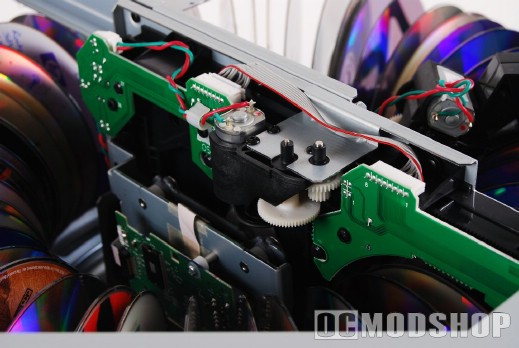
Many DVD drives have an “eject pinhole” that will open the tray in case of a failure, but this unit does not have a traditional tray, and there is no “override” button that I could see. The only way to liberate our Scottish Hero was to shut off the power (otherwise the gears will be locked in place) and manually turn the two motor gears that secure the disc.
There are two white plastic gears on the inner drive: one that loads the disc from the Media Ring, and the other that clamps the drive itself onto the media. The lower right gear must be loosened first, which unclamps the drive from the disc. Once the disc is free, you can turn the top right gear to move a plastic arm that moves the disc back onto the Media Ring. You must leave the motors in their “open” state when you power the unit back on, or else they will remain locked.
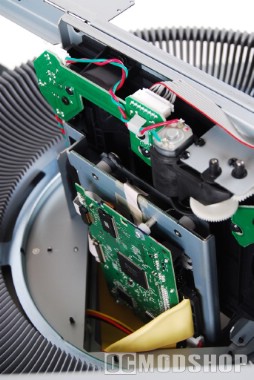
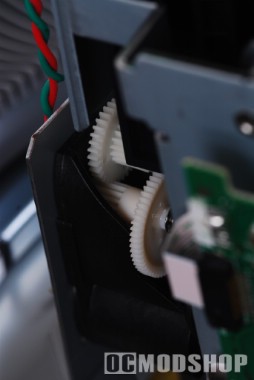
Once our simple repair was done the Media Changer worked just as well as it did before. The average consumer that runs into this problem will likely think their unit is broken and go through a lengthy return procedure just to have another unit do the same thing (as I’ve concluded by reading consumer reviews about this item).
When all of your discs are successfully scanned, all DVD movies appear under the “My DVDs” area of Media Center by title. You just select the movie you want, and the changer automatically loads that disc and begins playing it.
If you have a bunch of Divx files on DVD, then loading them is a little more complicated. You must go to the “Manage Discs” button under “My DVDs” or “More Programs” to get a list of the disc titles. You select the disc you want to load, and the Media Changer spins around and loads the media. You must then go to “My Videos” and the selected disc will appear as one of the folders. You can then browse the files on the disc.
I was very dissapointed with how files were indexed, as I was expecting a seamless experience similar to DVD movies. I want to be presented with a list of files to choose from, and I should be able to select the file to play and the changer would load up my selection. Another nice feature would be the ability to queue up movies: like playing all six discs of the Director’s Cut of the Lord of the Rings trilogy in order automatically.
One thing we were dismayed with is how the drive reacts to discs with small files on them. DVDs that had several Divx movies on them would make the drive spin very fast, which made it VERY loud. Some discs were better than others, but this was unpredictable. We have some high-definition WMVs that are technically “files” on DVD, but the Sony Changer did not become noisy on these discs.
Because the sotware isn’t very seamless when accessing “file-based” movies, it is not really possible to share this unit on your network. We could share the DVD drive out and other computers could only see the currently loaded DVD, and there was no way to change it. Because of Digital Rights Management, a Media Center Extender (such as an Xbox 360) cannot stream DVD video over a network. It appears that in its current form, the Sony Media Changer can only be used on the HTPC it is attached to, and does not like to share its assets.