
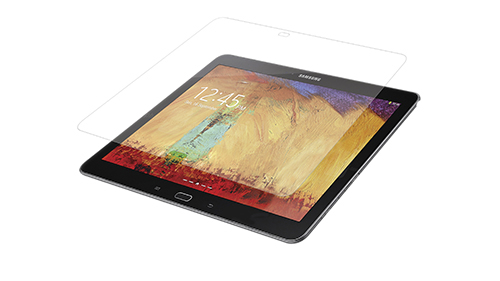
If you really want to look at the company’s own marketing fluff, it can be found here. The company claims that their High Definition Invisible Shield screen protector is self-healing, offers military-grade scratch protection, provides advanced clarity, and has a glass-like surface.
The kit comes with a small pre-filled water bottle, a rubber squeegee, lint-free cloth, a small instruction leaflet and the screen protector itself. The screen protector has adhesive on one side, so it is protected between two peel-away acrylic sheets.
The most crucial part of installing an advanced screen protector is the installation, which requires a bit of preparation to do properly. These common-sense things are also in the instruction sheet, but are worth repeating. Basically you need to be in a dust-free room (like a bathroom instead of your computer room), clean the screen thoroughly, spray your fingers with the included solution before peeling the protector. From there, just align the top of the Invisible Shield with the top of your device, and drape the rest down the glass face and the squeegee out the water.
Of course, since your device is coming into contact with water, the destination tablet should be turned off. This not only helps prevent any potential electrical shorts, but the heat produced by the screen’s lights could make the protector dry unevenly. The water acts as a temporary barrier between the protector’s adhesive and your screen, so you can reposition if necessary.
The protector will not look exactly perfect right after application, even if you do manage to squeeze out every bit of water. I even had a few air bubbles that did not look like they would go away, but after 3 days the Invisible Shield settled and is practically flawless.
The “original” Invisible shield has a slight texture to it, and “anti-glare” protectors make the image fuzzy and introduce chromatic anomalies. I installed the High Definition version of the Invisible Shield for my Samsung Galaxy Note 10.1 2014 tablet to maintain the extremely crisp visuals of the 2560 x 1600 resolution.


7 comments
[…] after a while. The ZAGG protector on my old phone is still perfect, even after two years of service.LinkTweet !function(d,s,id){var […]
Very interesting. Would they happen to make them for Kindle Fire too?
[…] ZAGG Invisible Shield HD (Galaxy Note 10.1 2014) Review @ OCmodshop […]
[…] ZAGG Invisible Shield HD (Galaxy Note 10.1 2014) Review @ OCmodshop […]
[…] ZAGG Invisible Shield HD (Galaxy Note 10.1 2014) Review @ OCmodshop […]
[…] Link Like this:Like Loading… (adsbygoogle = window.adsbygoogle || []).push({}); @import url(http://www.google.com/cse/api/branding.css); […]
[…] more here: …Invisible Shield (Samsung Galaxy Note 10.1 2014) Review—OCmodshop.com Tweet !function(d,s,id){var […]