Before getting this Logitech MX510 I had been using a mouse with only two buttons and a scroll wheel for many years. Immediately I could feel how much nicer this mouse tracked and how it was so much more accurate than any other I had ever used. It did take me about a week to get used to all the buttons the mouse had however after using the mouse for about two weeks now I don’t know how I ever functioned without them. Not only was the mouse more responsive and accurate but it is extremely comfortable to use and fits perfectly into my hand. All of my applications are easier to use, especially browsing with the forward/back buttons.
Game testing
I don’t have a whole lot of time to play games these days because of my schedule but when I do get the time I like to enjoy myself. With my previous mouse which was a standard optical mouse with a scroll wheel it would get frustrating to game. The design of the mouse made it really hard to hold and felt very poorly built. Not only was it poorly designed but it was not as responsive as I needed it to be and was not accurate. Now that I am using this MX510 I can enjoy the time that I get to spend gaming. Since using this mouse my score has improved, I can feel the responsiveness of the mouse, and comfortable is an understatement. I never really knew how important a good mouse was until I laid my hands on this MX510. For you gamers out there I would suggest no other mouse for you unless you. As far as upgrading from a MX500 if you have one I cannot say since I have never used that mouse nor can I compare it against this one. However most of the features are the same with the exception of the improvements to the MX engine.
Refresh rate testing
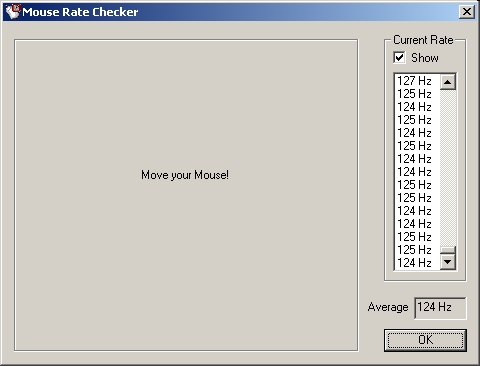
I wanted to do some sort of conventional testing however there really isn’t a tool to test mice. The best I could do is find a refresh rate checking program which outputs the refresh rate of your mouse as you move it in the program. The average refresh rate for this mouse was 124-125 which is just about the highest you will see with any mouse. A lot of the time you will have to use a separate program to tweak your mouse to this high of a refresh rate because it is so low. This is not the case with the MX510 and anything higher than 125Hz isn’t really necessary as far as I know.
Conclusion
This is one of the most exciting reviews I have done in a long time and it is a mouse. After getting fed up with my previous mouse and how bad it was I started looking for the best mouse on the market. The overwhelming response from everyone I talked with was to get a Logitech MX500 or MX510.
Now that I am a MX510 user I understand why everyone vouches for this mouse and says it is the best. Not only is this mouse technically superior to all others it looks great and is very comfortable. Simply put this is the best mouse I have ever used and you cant go wrong with it. If you are a gamer you will notice the difference in your game and feel the response this mouse offers to your movement.
I am extremely pleased with with this mouse and am going to give it a 10/10 and award it the OCmodshop Seal of Approval. I would like to thank Logitech for sending me this product to review.
Pros

- Superior 5.8MP MX engine
- Very accurate and smooth
- Forward, back, cruise, and quick switch buttons
- Extremely comfortable
- Looks amazing
- USB and PS/2 compatible
- Drivers for Windows and OS X
Cons
- Wouldn’t work for left handed people