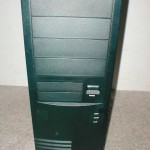
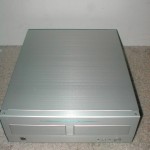
I will be using an EPoX 8K3A+ with my Athlon XP 1800+ (1.53GHz) overclocked to 1737MHz which registers as a 2100+. I will not be using the Koolance probe for this testing because the readings are so far off the actual temperature. I will be using Motherboard Monitor to get the temperature readings of the CPU. This was done by setting motherboard monitor to “Winbond Diode 2” which will read the on-die thermal diode of the XP. Like I said before I will be using Arctic Silver 3 as the thermal compound because it is the best on the market. Idle temperatures were taken while idling in the BIOS and the load temperatures were achieved by using Prime95 which put the CPU up to 100% for 15 minutes.
[wpdm_package id=’28851′]
Test Bed
- EPoX 8K3A+
- 1800+ Athlon XP
- 80GB Maxtor ATA133 HDD
- Corsair 512MB XMS3200
- 3DPower Geforce 3
- Cooler Master ATC-101-SX2
- Zalman 300w PSU
- Sound Blaster Live! Value
- ATi TV Wonder VE
- 10/100 NIC
- Plextor 40x12x40 CDRW
- pioneer 16x DVD
One thing I really like about the Exos is that it starts up when your computer starts up which is done through the expansion slot interface. Because your power button signal is fed through the interface and then to the motherboard both the computer and the Exos know when to start up. This is a great feature because traditional watercooling setups the pump either has to be plugged into the wall or you have to mod your power supply and hook up a relay. After turning on the computer I entered the BIOS and idled for about 15 minutes and watched the temperature screen of the BIOS because it pulls the temperature right off the onboard diode of the Athlon XP.
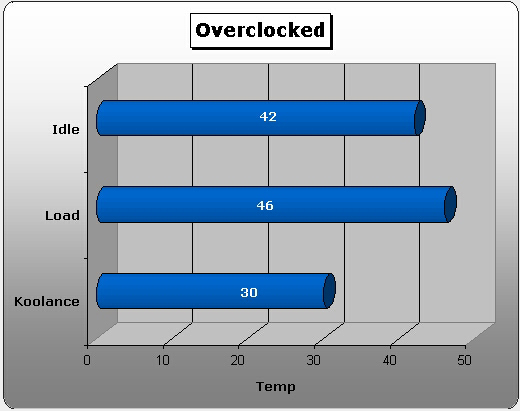
The idle temperature maxed out at 42 degrees Celsius. I booted up the computer and loaded up Prime95 after running that for a wile the load temperature came in at 46 degrees which isn’t bad. I also included the Koolance temperature reading, the reason there is only one temp rather than one for idle and load is because the temperature never really changed. From idle to load the temperature that is displayed on the front of the Exos really didn’t change, at most 1 degree. Yes a CPU temperature of 30 degrees Celsius is impressive and cool to show off but this is not an accurate measurement.
The Exos has the three different modes, mode one is where the fans will operate at 45% and then speed up to 100% when the temperature reach 45°C. Mode 2 is where the fans will run at 45% until 35°C, then speeds gradually increase to 100% at 40°C. Mode 3 is where the fans will run at 100% all the time. I always kept it on mode 1 because I did not want the fans speeding up to 100% because it was really loud and didn’t do a whole lot more.
Conclusion
This is my first experience with a Koolance product and it was basically what I was expecting. The best thing about this product is that it can be used with any case and the three main socket types on the market now which are socket A, 370, and 478. This Koolance Exos system also looks pretty cool and will go best with a black case, although I wouldn’t be surprised if Koolance came out with some other colors in the future.
The Exos is very quiet in mode 1 and 2 but mode 3 is much too loud for me, of course from my testing there was really no reason to use mode 3. Another thing about this setup is the expansion slot interface which allows the tubing and power to be connected along with some other nice features.
The overall cooling performance of this Exos is pretty good, there are much better watercooling setups on the market now which are also cheaper. The main reason to get this setup over another watercooling one is the ease of use. With this system there is really not that much to do; just put it on top, fill it, connect it, and your ready to go. If you are going to get this Exos you will also need to buy a block for it because it does not come with one.
Mode 3 of the Exos runs the fans at 100% speed and they are much too loud for my taste and do not change the cooling at all really so I don’t see the point in having it or using it. Another thing that I do not like is the fact that the LED tempature indicator is way off from the actual temperatures so don’t rely on it.
Overall I am pretty impressed with this unit; it has a lot to offer especially to a newcomer to watercooling. If you have never used watercooling and want something simple this is the product for you. If you are looking for the best performance DIY style you will really want something else. Overall I am going to give this Exos an 8/10, I would like to thank Sharka Corp for providing this unit for review. You can pick up this product along with most of the accessories from them.
Pros
- All in one watercooling system
- Will work with any case
- Works with socket A, 370, and 478
- Looks pretty darn cool
- Quick-connect fittings
- Quiet in mode 1 and 2
- Great expansion slot interface
- Powers on when your computer does
- Lots of accessories included
- More than enough tubing provided
- Pretty good performance
Cons
- High price, around $270
- Block not included
- Mode 3 is loud and ineffective
- Temperature display LED is inaccurate