
Turning the headset on requires that you press the power button for at least 1 second (anything less could be considered an accidental press). Turning the headphones off requires that you hold the power button for at least 3 seconds (once you release the power is turned off). In wireless mode, the headphones can power themselves off if no audio centent is heard for about 10 minutes (as far as I know there’s no way to adjust this).
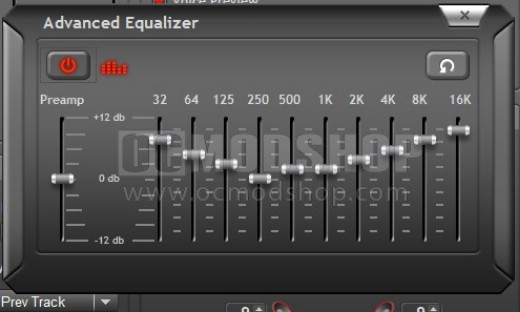
The headset can be used wirelessly, or wired (with the included USB cable plugged in). The headset can be used immediately after plugging in the receiver and turning the headset on, but has limited functionality until the software is installed. By default, the headset works in stereo mode, and even switching the Dolby surround switch won’t change things until the included software is turned on. Once the software is installed, you can set a custom equalizer, use voice morphing, set profiles and check the battery status.
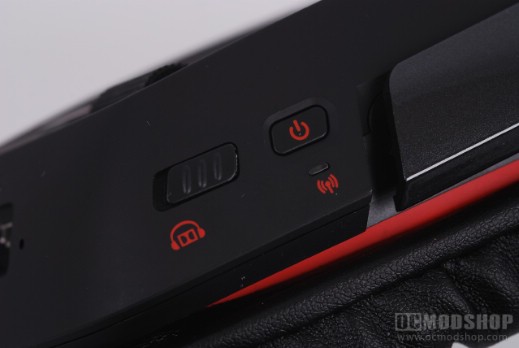
The headphones had limited functionality when plugged into our powered Belkin USB hub. The headphones would work, but only in stereo mode. Only when the receiver is plugged directly into a computer USB port were all of the features unlocked. It didn’t matter if we used the included USB cable or the receiver: the headphones would not work properly unless plugged directly into a USB port.
The headphones are surprisingly comfortable, especially for being so hefty. There is no active noise-cancellation, but the around-the-ear cups do a very good job of sealing away the outside world. The OCMS office has several noisy PCs, and they were virtually silenced with this headset equipped, but not nearly as much as active noise-cancellation technology.
When the receiver stick is plugged in, Windows automatically switches the audio device to the headset; just like every USB-based headset I’ve tested behaves. The problem is that the default audio device is not switched back unless the dongle is unplugged. Turning on and off the headphones should be the trigger that changes the device, not that the stick is plugged in. If you have the stick plugged in and have the headphones turned off, then you hear absolutely nothing, which could be confusing to some, especially if they swtich between speakers and headsets. It is rather annoying to unplug a USB stick (which could get lost) just to hear the attached speakers.
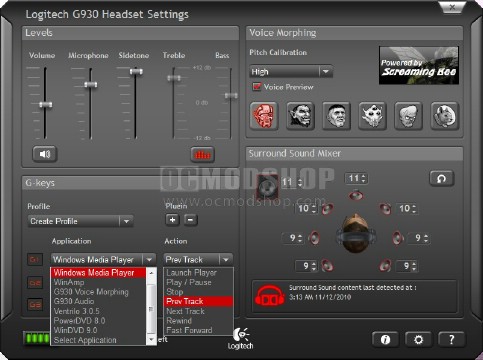
The G930 software. Note the Surround Sound Mixer and G-button function assignment areas
One of the best software features about this headset is the ability to granularly tweak the surround field’s volume. The volume of each channel can be adjusted between 1 and 11, but anything below 6 is practially inaudible. I find that an adjustment of 1 is a significant enough change to differentiate the channels. Some games (particularly games using Valve’s Source engine) sound like all of the audio has been pressed into an “audio meat grinder” and spat out in a mono channel. Using the Surround Sound Mixer makes the directional sound-field in these games more obvious.
The microphone works great, although as I mentioned before the sample I was given does not have a red mute LED when the microphone is turned off. Users can use one of six pre-defined Voice Morphing characters, and it’s a shame that these cannot be customized (imagine an entire game of Counter Strike where everyone sounds like a Space Squirrel). There is a dropdown control in the software that allows the software to pick up your voice (Lowest to Highest). If you choose the wrong range of voice, then the effect can sound choppy.
The programmable G-keys are really handy… once you’ve used them then you really can’t live without them. There are lots of pre-programmed functions, like skipping tracks in Windows Media Player or switching Voice Morphing characters and audio tone. There’s even support for Ventrilo, so you can press a button to “Push to Talk” or issue commands. It appears that as of right now you’re stuck with the pre-programmed applications, because the “Select Application” drop-down has no assignable actions. You can add Plugins to support additional games or applications, but none are currently available that I know of.
The software also has information such as battery status, and when the last Surround Sound content was detected. This last bit could be helpful in determining if you’ve accidentally set a game to use stereo sound rather than 7.1.