
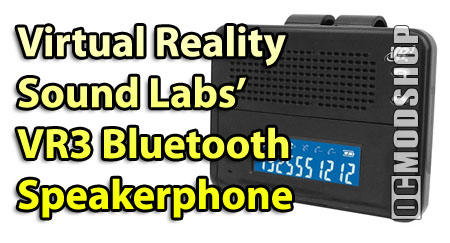
I know, strange we would get an item like this to review at a PC equipment and gaming site, but sometimes we make friends with vendors and they have such cool gadgets we here at OCMODSHOP can’t help but get excited about cool gizmos and gadgets.
Take this nifty little number for instance, the VR3 Bluetooth hands free cell phone car kit. It kind of looks dated but packs a surprisingly clear punch when it comes to actual usage. So, what can this little baby do for you? Well, first of all, since it is a bluetooth hands free device, you can hang it on your car’s visor and have it relatively close to you when speaking on the phone.
“But Mike, my cell phone already has a speakerphone on it.”

Well that’s nice, so does mine, but chances are it is not as good an speaker as the one featured on the VRBT200V (that’s the model in case you were wondering). A clear sounding speaker that has adequate volume on it so that you can hear and be heard quite easily. If you have bluetooth technology on your phone, you will probably understand that driving with that little ear bud clip can get annoying, especially if you have other people in the car and they want to have a conversation with you. Sure you could pull it out and put it into the cup holder, only to forget about it later and place the “Wendy’s” 72 oz. soda on top of it, crushing it appropriately.

The 200V is a strongly designed piece of equipment that has a thick clip attached to it for attachment to your visor. The lower part of the unit is a blue screen that can be bent on a hinge for proper angle viewing. Since this is an extension of your phone you can answer it by pressing the appropriate button, so being able to view the number of who is calling you is important. The angle adjustment was a real plus and with it’s bright light, it was easy to read even in the daylight. The folks at VR3 made things easy on the end user as well, with really only three buttons (with multiple functions) the 200V is a well thought out piece of equipment.

Interestingly enough the unit comes with an earpiece as well, which kind of made me scratch my head, I mean the whole point of this unit is the nice loud speaker it offers the user. Plus the earbud that comes with the unit is fairly generic and offers nothing to the value of the unit.



34 comments
I purchased a new one of thiese and I misplaced my instructions I do have the original box I got it at COSTCO how can I get a copy of the instructions…..Thanks
works very nice. but got from a friend still has there numbers in it. how can i reset it to remove there info?
i need instructions how to pait to my iphone4 cell phone for vr3 vrbt200
I have just bought one but my cell phone not finding the VRBT200V device even I tried to follow its direction. I am disappointed with ads on this product.
I bought a couple of months ago a VRBT100P, and never used before. This week I tried to use but I am having trouble to put it on. I did one time, and paired, after that did not work anymore.
Can you help me?
I bought a used one on Ebay with no instrustions and can't get it to sync my lg rythmn.nned help.
http://www.vr-3.com/downloads/VRBT200V_eng.pdf
I found the instructions for all those that needed it… http: http://www.costco.com Images Content Misc PDF 222190.pdf
Just like the rest of these folks, my unit will not pair.
I also bought one without a manual. Were can I find the manual? Plaae advise. Also I have an Iphone and I am hoping it will work with it.
i am very disappointed in this product as it sounds great but the clip is cheap and it broke off mine and now i can put it on my visor and its brand new only just from christmas
I have the same problem like most people. Tried (repeatedly) the
Thanks Richie. I spent a week trying to find a users manual online. I did what you said and now my new ENV 3 is paired with the VR3.
Dear sirs, I have a motorola w490 and I'mm trying to pair the VR3. I have the VR# flashing red and blue for pairing and the phone won't recognize it.
I have a older VR3 device that plugs directly into car charge port but i can not remember how to sinc it with my blutooth phone can someone help me out
Is there a volume control? I've tried to play with the small "wheel" at the top, but not having any success. HELP
MY 12V DC Charger (VRBT-200V VRBT 200V) Broke. Can anyone tell me where I can purchase one or one that is compatable to this unit. It took me awhile to learn how to use it, but I do like the unit.
The pairing code is 8888 info can be found at http: roadmasterusa.com downloads VRBT100P_eng.pdf
I bought two units. I'm using one and the other is for my girlfriend. Mine works great, but she is having trouble. The TROUBLE is that we both have lost the instruction booklet. Where can I get one?
Go to Radio Shack for charging help. They have a gizmo which plugs into 120v and provides 12v charging to the plug which come with the new unit.
This unit is great, but it needs someone to write a better instruction booklet.
I bought a used car at an auction and I just noticed the vr3 on the visor. I wanted to know if I could charge it with my usb port because I don't have the car charger cord.
Hold onto the second button until you hear a long beep and see 2 buttons flashing red and blue. Then use your phone to pair with the device and the code is "0000".
I lost the instructions on how to load this unit on my phone, could you tell me where I can obtain instructions on installing this unit on my cell phone?
I purchase a new phone and it keeps asking for a code # which i don't have. What code is it requesting?
I have just been given a vr3 but it did not come with instructions please could you tell me were i could pick some up
Go to your local Radio Shack… if they don't have a way to do it then you'll have to build one.
Any suggestions for an AC power converter that I could use with 120 volt house current to plug this unit in to instead of the cigarette lighter connection on the car? It will not charge up unless my car key is "on" so I would like to charge it with a home AC connection.
hi,go to http://www.sewelldirect.com and look for wireless bluetooth products. and you will find your manual good luck paul
I bought one and can't get it sync'd with m phone. I keep trying to activate the Blue tooth search function. But nothing. Any comments or do you have a number or email to customer support…
Very helpful information, but I bought one that did not have a manual for setting up voice activation. Any idea where I can get a manual without having to buy another unit?
I received this vr3 but no book to show me how to paired. is there a web site where I can find info
thank you
http://www.costco.com/Images/Content/Misc/PDF/222…
This may help…..
i recently purchased the blackberry storm and i have not been able to paired with the VRBT200V any suggestion??
Very nice i like virtual so much
The instructions are on the back on the visor clip. Pairing code is 0000.