
Button tab
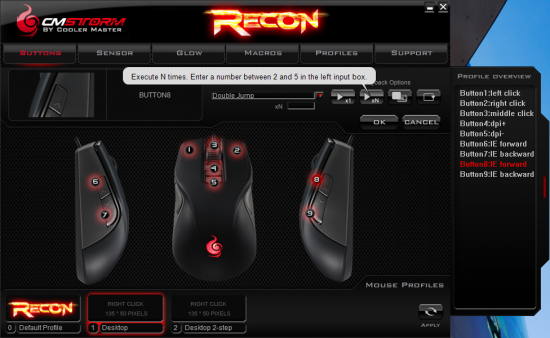
You can assign each of the eight mouse buttons to one of many functions.
- Default (left click right click, middle click, IE forward, IE back, DPI+ or DPI-)
- Mouse function (left click, right click, middle click, IE forward, IE back, scroll up, scroll down, scroll left, scroll right). Also supports playback options
- Keyboard key (assign any mouse button to a key on your keyboard)
- Macro (select from a dropdown list of macros defined in the Macro tab). Supports Playback Options
- Advanced (volume up, volume down, profile up, profile down, play/pause, mute, stop, next track, previous track, dpi up, dpi down)
- Disable
Sensor tab
The sensor tab allows you to configure up to four pre-determined levels of DPI sensitivity for each profile (800dpi, 1600dpi, 3200dpi, and 4000dpi). The software does not allow any level in between, so you cannot set a DPI of 2000, for example.
You don’t have to use all four DPI levels. You can select any number of DPI levels, as I have one profile that has only one, another that has only two (so I can toggle between high and low mode without having to switch in-between), and other profiles that use all four. It would be really handy if the software supported a “toggle DPI levels” so that if you were at the highest DPI setting it would cycle through them back at the bottom… that way I could press only one button to switch between high and low, as the SteelSeries Ikari does.
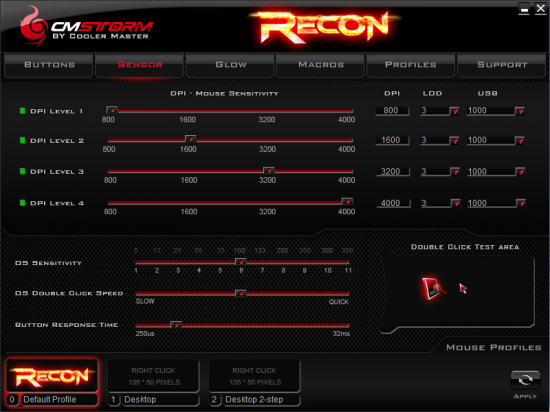
You can also set a Lift Off Distance (LOD) and USB poll rate for each DPI level. When testing, we really couldn’t tell much of a difference between an LOD of 1 and an LOD of 5, as the mouse would still track about 1/8th of an inch above our mousepad.
You can also set DS Sensitivity between 1 and 11, which appears to operate similarly to how “mouse acceleration” works. One of the reasons to use a highly sensitive mouse is so you can turn mouse acceleration off, so no movements are interpolated.
You can also set the double-click speed and button response time. The button response can be between 250 micro-seconds and 32 milli-seconds.
We got your Glow on the next page…


1 comment
I like this mouse. Nicey nice.
Comments are closed.