
Glow tab
The Glow area lets you set one of 10 pre-defined colors (red, orange, yellow, light green, teal, aqua, blue, navy, purple and pink) to each of the three LED areas of the mouse (mouse wheel, buttons 5/6, and the Coolermaster logo). Each LED zone can have its own color, so you could have a multi-toned mouse depending on your preference.
You can also enter in your own color by modifying RGB values, so it’s possible to create white, but most other colors probably won’t show up as well as the pre-defined colors. You can also set each color’s intensity, so you can make each color very dim or very bright.
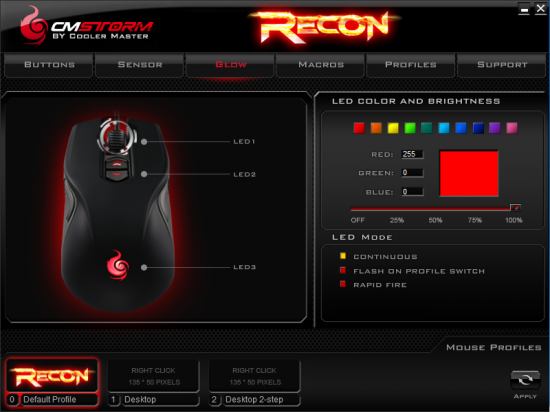
The default profile changes each of the LEDs with the DPI level, but I’ve had a hard time duplicating this in any custom profile. It would be very handy to change the logo color for each profile, and the mouse-wheel color for each DPI level, but it doesn’t appear to be possible with the current version of the software.
The LED mods can be set to Continuous, Flash on Profile Switch, or Rapid Fire. Rapid fire causes the LEDs to “flash” upon each button click, which provides a nice visual feedback that many gamers will like.
Macros tab
The Macros tab allows you to create any number of macros, which can then be assigned to any button via the Buttons tab. The Macro screen is actually one of the easiest I’ve seen to create and edit macros. You can set a default delay between actions (no delay, Record actual delay, 16ms, 32ms, 64ms, 100ms, 250ms and 500milliseconds).
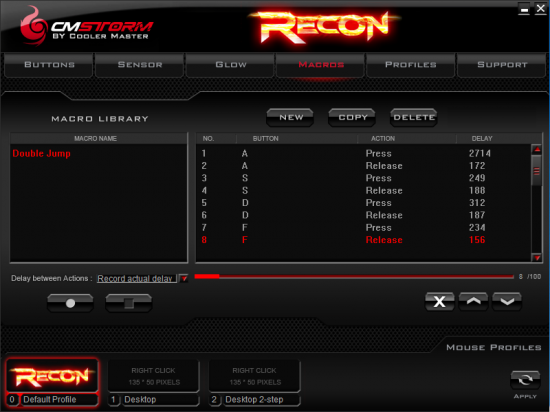
Just press the record button and start pushing away keys or mouse clicks and the macro window shows your display. It records all key presses and releases, so it’s possible to hold down keys while pressing others. You can record up to 100 different actions, and a percentage bar fills up as you record.
There doesn’t appear to be a way to edit any individual event, so if you mess up you pretty much have to scrap it and start over. You can change the order of the events, and can start recording in the middle of a list of events, but if you need to edit the delay or any other editing then you pretty much have to scrap the whole thing and start over.
On the next page we set some Profiles…


1 comment
I like this mouse. Nicey nice.
Comments are closed.